
Lab 02 — Realtime agent: step-by-step workshop
Português · Workshop index · ← Lab 01
This workshop builds a real speech-to-speech application through concrete actions: open the terminal, create the named file, add its complete content, run the checkpoint, and only then continue.
When you finish, you will have a Next.js application that:
- creates a short-lived Realtime client secret on the server;
- keeps
OPENAI_API_KEYaway from the browser; - connects audio and events over WebRTC;
- handles connection, listening, thinking, speaking, mute, and interruption;
- provides text fallback and an in-memory transcript;
- explicitly ends and cleans up the session;
- has tests that open no billable session;
- can be deployed with HTTPS.
Start in 5 minutes
If you already have an API key, a microphone, and active billing, run the finished solution:
git clone --depth 1 https://github.com/glaucia86/openai-voice-playground.git
cd openai-voice-playground/labs/lab-02-realtime-voice-agent
npm ci
cp .env.example .env.local
npm run dev
On Windows PowerShell, use Copy-Item .env.example .env.local. Fill OPENAI_API_KEY= before starting, visit http://localhost:3000, read the privacy notice, use headphones, and end the session explicitly. A live test consumes API resources.
Would you rather build it?
- With guidance (recommended): use the starter branch and the first checkpoint.
- From an empty directory: open Chapter 1 and choose the complete path.
- Finished code: inspect the
mainimplementation without replacing your work.
See the outcome before building
The recording must show consent, connection, speech, interruption, mute, a text message, and explicit ending with microphone release. It will be added after a controlled session with no personal data.
Follow the safe recording plan →Architecture on one screen
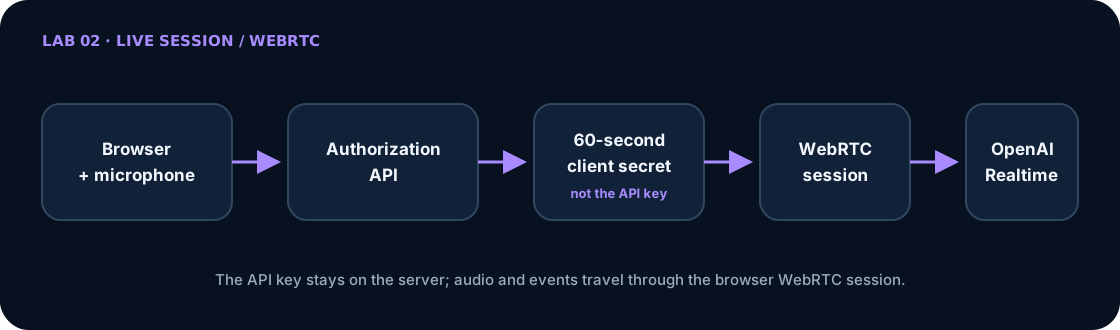
The server uses OPENAI_API_KEY only to validate the request and issue a short-lived client secret with no-store. The browser uses that temporary secret to negotiate a WebRTC session directly with the Realtime API; live audio and events do not continuously traverse the Next.js server. The client secret is still a bearer credential: issue it only when needed, never log it, and do not treat it as a replacement for production authentication, consent, distributed quotas, and session limits.
Comprehension prompt: why does a 60-second client secret reduce risk without making the browser a trusted boundary?
Choose a learning path
| Path | What you do | Recommendation |
|---|---|---|
| A — run and investigate | clone main and inspect the finished solution |
useful for meeting Realtime first |
| B — build from the starter | begin with a compilable scaffold and implement each slice | recommended for this workshop |
| C — create from zero | create directories, configuration, and dependencies too | useful for deep study or a longer class |
The workshop guide explains how to preserve your work and inspect checkpoints without destructive commands.
Start here
- Prepare the account, terminal, microphone, and project — Choose a path, protect the API key, and prove the base runs without starting a session.
- Build the application file by file — Create the contract, authorization, client secret, agent, WebRTC flow, state model, interface, and tests with complete files.
- Run, diagnose, and deploy — Run the gates, perform a short smoke test, troubleshoot microphone/WebRTC, and publish over HTTPS.
Read the Lab 02 architecture article before or after implementation for deeper reasoning. The article explains why; the chapters above direct your actions.
Recommended starter
git clone --branch workshop/lab-02-v1-starter \
  https://github.com/glaucia86/openai-voice-playground.git
cd openai-voice-playground
git switch -c my-lab-02-solution
npm ci --prefix labs/lab-02-realtime-voice-agent
npm run check:lab02
The first gate must pass without an API key, microphone permission, or OpenAI session. Then open Chapter 1.
Recovery checkpoints
| After completing | Reference | Compare |
|---|---|---|
| initial base | workshop/lab-02-v1-starter |
starting point |
| session contract | workshop/lab-02-v1-step-01-session-contract |
view diff |
| authorization and client secret | workshop/lab-02-v1-step-02-authorization |
view diff |
| conversation and interface | workshop/lab-02-v1-step-03-conversation |
view diff |
Commit your branch before comparing. Checkpoints are reading references, not shortcuts for erasing your implementation.
Before continuing, confirm that: you know when the microphone will activate, know how to end the session, chose a path, and can distinguish the standard API key from the short-lived client secret.
Final evidence
npm run check:lab02
git status -sb
The first command runs lint, TypeScript, tests, and a production build without enabling the microphone or opening a paid connection. The second must confirm that no secret or generated artifact entered Git.